Prebuilt workflow · Design → code

Component Extractor

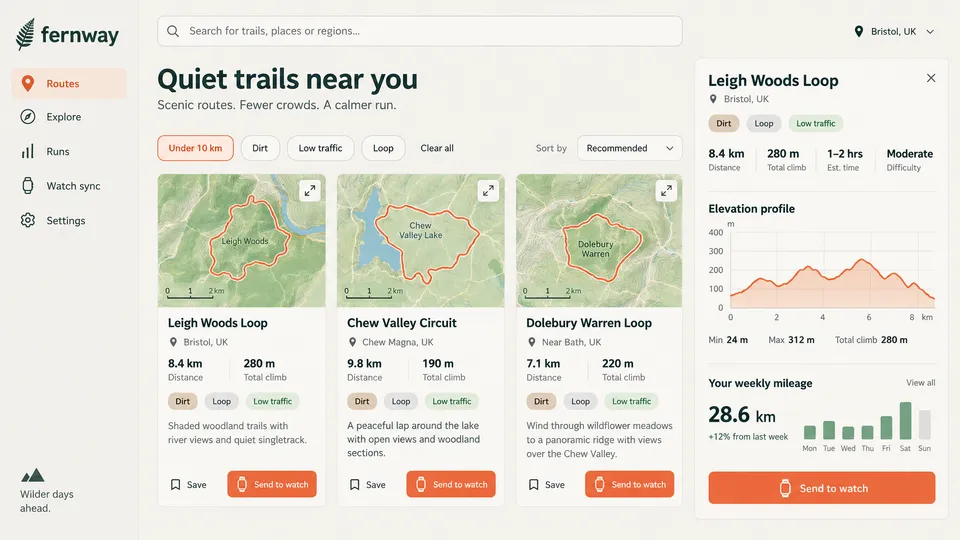
Turn a UI design into a typed React component — plus a Storybook story to document it.

· You bring UI design· Component.tsx· stories.tsx

Extract Component
Claude Opus 5.5High

Analyze this UI design and generate a production-ready React component: Requirements: - TypeScript with proper interface for props - Semantic HTML elements (header, nav, main, section, article, etc.) - Tailwind CSS utilities (no custom CSS) - Responsive: mobile-first with sm:, md:, lg: breakpoints - Accessibility: aria-labels, roles, alt text, focus states - Modern React: functional component, proper hooks usage Structure the component with: 1. Props interface at the top 2.…

16 lines · 629 charsEditorExpand
AttachmentsResponse
CODE$0.56Run
COMPOSEtsx
import React, { useMemo, useState } from 'react';
import { Trail, DayMileage } from './types';
import { trails as defaultTrails, weeklyMileage as defaultMileage } from './data';
import Sidebar from './Sidebar';
import TrailCard from './TrailCard';
import TrailDetailPanel from './TrailDetailPanel';
import { SearchIcon, PinIcon, ChevronDownIcon } from './Icons';

export interface FernwayDashboardProps {
  trails?: Trail[];
  mileage?: DayMileage[];
  location?: string;
  onSendToWatch?: (trailId: string) => void;
}

type FilterId = 'under10' | 'Dirt' | 'Low traffic' | 'Loop';
type SortId = 'recommended' | 'distance' | 'climb';

const filters: { id: FilterId; label: string }[] = [
  { id: 'under10', label: 'Under 10 km' },
  { id: 'Dirt', label: 'Dirt' },
  { id: 'Low traffic', label: 'Low traffic' },
  { id: 'Loop', label: 'Loop' },
];

const FernwayDashboard: React.FC<FernwayDashboardProps> = ({
  trails = defaultTrails,
  mileage = defaultMileage,
  location = 'Bristol, UK',
  onSendToWatch,
}) => {
  const [nav, setNav] = useState('routes');
  const [query, setQuery] = useState('');
  const [active, setActive] = useState<FilterId[]>(['under10']);
  const [sort, setSort] = useState<SortId>('recommended');
  const [selectedId, setSelectedId] = useState<string | null>(trails[0]?.id ?? null);
  const [saved, setSaved] = useState<Set<string>>(new Set());
  const [status, setStatus] = useState('');

  const toggleFilter = (id: FilterId) =>
    setActive((prev) => (prev.includes(id) ? prev.filter((f) => f !== id) : [...prev, id]));

  const toggleSave = (id: string) =>
    setSaved((prev) => {
      const next = new Set(prev);
      next.has(id) ? next.delete(id) : next.add(id);
      return next;
    });

  const send = (id: string) => {
    const t = trails.find((x) => x.id === id);
    setStatus(`${t?.name ?? 'Route'} sent to your watch.`);
    onSendToWatch?.(id);
  };

  const visible = useMemo(() => {
    const q = query.trim().toLowerCase();
    const list = trails.filter((t) => {
      if (q && !`${t.name} ${t.location}`.toLowerCase().includes(q)) return false;
      return active.every((f) => (f === 'under10' ? t.distanceKm < 10 : t.tags.includes(f)));
    });
    if (sort === 'distance') return [...list].sort((a, b) => a.distanceKm - b.distanceKm);
    if (sort === 'climb') return [...list].sort((a, b) => a.climbM - b.climbM);
    return list;
  }, [trai…
Component.tsx168 lines · 7.7k chars
CODE
IMAGE
Upload Design
Upload Design16:9
IMAGE
Generate Story
Claude Opus 5.5High

Based on the UI design, generate a Storybook story file for testing and documentation: Requirements: - CSF 3.0 format (Component Story Format) - Meta object with title, component, tags - Default story showing the main state - At least 2-3 variant stories (e.g., Loading, Empty, WithData) - Args/argTypes for interactive controls - Proper TypeScript typing Example structure: import type { Meta, StoryObj } from '@storybook/react' import { ComponentName } from './ComponentName' …

21 lines · 671 charsEditorExpand
AttachmentsResponse
CODE$0.56Run
COMPOSEtsx
import type { Meta, StoryObj } from '@storybook/react';
import { fn } from '@storybook/test';
import { TrailsDashboard } from './TrailsDashboard';
import { sampleTrails, sampleWeeklyMileage } from './data';

const meta: Meta<typeof TrailsDashboard> = {
  title: 'Fernway/TrailsDashboard',
  component: TrailsDashboard,
  tags: ['autodocs'],
  parameters: {
    layout: 'fullscreen',
    docs: { description: { component: 'Route discovery dashboard showing quiet trails, filters, a detail panel with elevation profile and weekly mileage.' } },
  },
  args: {
    trails: sampleTrails,
    weeklyMileage: sampleWeeklyMileage,
    location: 'Bristol, UK',
    initialSelectedId: 'leigh-woods',
    initialFilters: ['Under 10 km'],
    sortBy: 'Recommended',
    loading: false,
    onSendToWatch: fn(),
    onSave: fn(),
    onSearch: fn(),
  },
  argTypes: {
    location: { control: 'text', description: 'Current user location' },
    loading: { control: 'boolean', description: 'Show skeleton loading state' },
    sortBy: { control: 'select', options: ['Recommended', 'Distance', 'Elevation'] },
    initialSelectedId: { control: 'select', options: [null, ...sampleTrails.map((t) => t.id)], description: 'Trail shown in detail panel' },
    initialFilters: { control: 'check', options: ['Under 10 km', 'Dirt', 'Low traffic', 'Loop'] },
    trails: { control: 'object' },
    weeklyMileage: { control: 'object' },
    onSendToWatch: { action: 'sendToWatch' },
    onSave: { action: 'save' },
    onSearch: { action: 'search' },
  },
};

export default meta;

type Story = StoryObj<typeof TrailsDashboard>;

export const Default: Story = {};

export const Loading: Story = {
  args: { loading: true },
};

export const Empty: Story = {
  args: { trails: [], initialSelectedId: null },
};

export const NoSelection: Story = {
  args: { initialSelectedId: null },
};

export const SortedByDistance: Story = {
  args: { sortBy: 'Distance', initialFilters: ['Dirt', 'Loop'], initialSelectedId: 'dolebury' },
};

export const DecliningMileage: Story = {
  args: {
    initialSelectedId: 'chew-valley',
    weeklyMileage: {
      totalKm: 14.2,
      changePct: -18,
      days: [
        { day: 'Mon', km: 2 },
        { day: 'Tue', km: 0 },
        { day: 'Wed', km: 4.1 },
        { day: 'Thu', km: 0 },
        { day: 'Fri', km: 3.1 },
        { day: 'Sat', km: 5 },
        { day: 'Sun', km: 0 },
     …
Component.stories.tsx80 lines · 2.4k chars
CODE
Run all

A real run, unedited2 generations · $1.11 of walletBrand and inputs are fictional, made in Vmotif · 2026-09-24

What came back

Straight off the canvas.

Everything below is what this run returned, untouched.

  • Component.tsxtsx
    import React, { useMemo, useState } from 'react';
    import { Trail, DayMileage } from './types';
    import { trails as defaultTrails, weeklyMileage as defaultMileage } from './data';
    import Sidebar from './Sidebar';
    import TrailCard from './TrailCard';
    import TrailDetailPanel from './TrailDetailPanel';
    import { SearchIcon, PinIcon, ChevronDownIcon } from './Icons';
    
    export interface FernwayDashboardProps {
      trails?: Trail[];
      mileage?: DayMileage[];
      location?: string;
      onSendToWatch?: (trailId: string) => void;
    }
  • Component.stories.tsxtsx
    import type { Meta, StoryObj } from '@storybook/react';
    import { fn } from '@storybook/test';
    import { TrailsDashboard } from './TrailsDashboard';
    import { sampleTrails, sampleWeeklyMileage } from './data';
    
    const meta: Meta<typeof TrailsDashboard> = {
      title: 'Fernway/TrailsDashboard',
      component: TrailsDashboard,
      tags: ['autodocs'],
      parameters: {
        layout: 'fullscreen',
        docs: { description: { component: 'Route discovery dashboard showing quiet trails, filters, a detail panel with elevation profile and weekly mileage.' } },
      },
      args: {
How it runs

One stage, all at once.

What each stage reads, what it makes and what it cost on this run. Steps inside a stage don’t wait on each other, so they run side by side.

  1. 01

    Extract Component & Generate Story

    Reads your inputsMakes 2 files

    2 steps, side by sideClaude Opus 5.5$1.11

From your agent

Or let your agent run it.

This run went through the Vmotif MCP server, the way Claude Code, Cursor or any MCP client drives it: seed the canvas, fill the inputs, run the graph.

create_canvas({ premade_workflow_id: "component-extractor" })
update_canvas({ canvas_id, updates: [/* your inputs */] })
run_workflow({ workflow_id: canvas_id })
MCP docs
More in Design → code

Drop in a screenshot, a live URL, or a brand reference and get production-ready front-end code back.