Prebuilt workflow · Design → code

Animation Capture

Point it at any live site, capture the motion, and reverse-engineer it into a Framer Motion component and CSS.

· You bring Live URL· analysis.md· Animated.tsx· animation.css

COMPOSEmarkdown
# Motion Analysis: vmotif.com Hero

## Overview

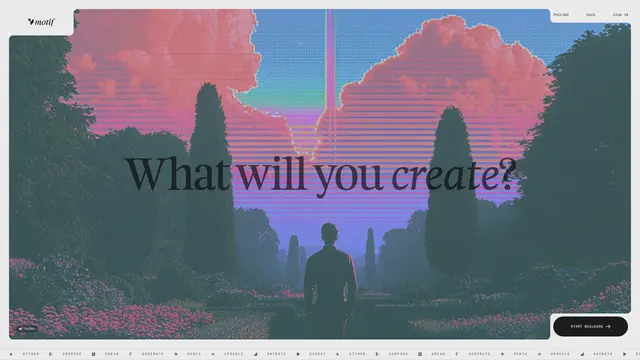
The eight frames show the **above-the-fold hero** of vmotif.com. Across the sequence, almost everything is **static**. The hero image, headline, navigation, sound toggle and CTA do not change.

The only visible motion is the **feature ticker (marquee) along the bottom edge**. It scrolls continuously to the left. Every other keyframe in the capture belongs to sections further down the page, such as workflow graphs, loaders and feature orbits.

---

## 1. Animation Libraries Detected

| Technology | Status | Evidence |
|---|---|---|
| GSAP | Not detected | No `gsap` globals or inline transform tweens |
| Framer Motion | Not detected | No `data-projection-id` or motion-generated styles |
| Lottie | Not detected | No `lottie-player` or bodymovin JSON |
| **CSS `@keyframes`** | **Primary engine** | 28 named keyframes captured |
| **CSS transitions** | **Used for UI states** | `background` / `color` at `0.28s` |
| **CSS Houdini (`@property`)** | **Likely** | `feat-orbit` animates the custom property `--feat-angle` |
| Next.js / React | Framework only | `<!--$-->` Suspense markers; no motion library attached |

**Conclusion:** This is a pure CSS animation system. Vanilla JS probably only toggles classes, for example the sound toggle and IntersectionObserver-driven reveals.

---

## 2. CSS Keyframes & Transitions

### 2.1 Hero-relevant keyframes (visible in the frames)

The bottom ticker is driven by one of the two looping translate keyframes below.

```css
@keyframes ticker {
  to { transform: translate(-25%); }
}

@keyframes marquee {
  0%   { transform: translate(0); }
  100% { transform: translate(-50%); }
}
```

The `-25%` value implies the ticker track contains **4 identical copies** of the item list. The `-50%` marquee implies **2 copies** and is probably used by a logo or model strip elsewhere on the page.

### 2.2 Global UI transition

```css
transition:
  background 0.28s cubic-bezier(0.16, 1, 0.3, 1),
  color      0.28s cubic-bezier(0.16, 1, 0.3, 1);
```

This applies to the nav links, the **Sign in** button, the **Start building** button and the **Sound** pill.

### 2.3 Remaining keyframes (below-the-fold sections)

**Entrance / reveal**
- `fade-in-up`: `opacity 0 → 1`, `translateY(20px → 0)`
- `sg-land`: `opacity 0 → 1`, `translateY(6px → none)`
- `cd-spawn`: `opacity 0 → 1`, using the individual `transla…
Animation Analysis263 lines · 10k chars
CODE
COMPOSEtsx
import React, { useRef, useState } from 'react';
import {
  motion,
  useAnimationFrame,
  useMotionValue,
  useReducedMotion,
  useTransform,
} from 'framer-motion';
import './feature-ticker.css';

export interface TickerItem {
  /** Visible label, rendered uppercase with wide tracking */
  label: string;
  /** Optional glyph or icon node shown before the label */
  icon?: React.ReactNode;
}

export interface FeatureTickerProps {
  /** Items in one set. The set is rendered 4x so a -25% shift equals exactly one set width. */
  items?: TickerItem[];
  /** Seconds to scroll ONE full set. The analysis recommends 20s (~30-40 CSS px/s). */
  duration?: number;
  /** Scroll direction. The original moves left. */
  direction?: 'left' | 'right';
  /** Pause while hovered or focused */
  pauseOnHover?: boolean;
  /** Horizontal gap between items in px. The original spacing is about 75-85px. */
  gap?: number;
  /** Fade the left and right edges with a mask */
  fadeEdges?: boolean;
  /** Accessible label for the list */
  ariaLabel?: string;
  className?: string;
}

const DEFAULT_ITEMS: TickerItem[] = [
  { label: 'Dither', icon: '▸' },
  { label: 'Compose', icon: '▚' },
  { label: 'Dream', icon: '▦' },
  { label: 'Generate', icon: '☾' },
  { label: 'Remix', icon: '+' },
  { label: 'Upscale', icon: '⇄' },
  { label: 'Animate', icon: '◢' },
  { label: 'Direct', icon: '▶' },
];

/**
 * Exactly 4 copies of the set are rendered.
 * The track is width: max-content, so translating by -25% moves it exactly one set width.
 * Wrapping at that point produces a seamless loop, matching the original `ticker` keyframe:
 * `to { transform: translate(-25%) }`.
 */
const COPIES = 4;
const LOOP_PERCENT = 100 / COPIES; // 25

/** Wraps v into the range [min, max). */
const wrap = (min: number, max: number, v: number): number => {
  const range = max - min;
  return ((((v - min) % range) + range) % range) + min;
};

export const FeatureTicker: React.FC<FeatureTickerProps> = ({
  items = DEFAULT_ITEMS,
  duration = 20,
  direction = 'left',
  pauseOnHover = true,
  gap = 80,
  fadeEdges = false,
  ariaLabel = 'Product capabilities',
  className = '',
}) => {
  const prefersReducedMotion = useReducedMotion();
  const [paused, setPaused] = useState(false);
  const pausedRef = useRef(paused);
  pausedRef.current = paused;

  // The position is stored in percent of the track width, in the ra…
AnimatedComponent.tsx144 lines · 4.8k chars
CODE
ANIMATE
https://vmotif.com8 frames · 4s
Captured frame of https://vmotif.com
FRAMES
Analyze Animation
Claude Opus 5.5High

Analyze the captured animation data and provide a detailed technical breakdown: 1. **Animation Libraries Detected** - GSAP, Framer Motion, CSS animations, Lottie, etc. 2. **CSS Keyframes & Transitions** - The actual animation code found 3. **Timing & Easing** - Duration, delay, easing functions (cubic-bezier values) 4. **Transform Properties** - translate, scale, rotate, opacity, skew changes 5. **Animation Triggers** - On load, on scroll, on hover, on click 6. **Sequence & …

11 lines · 672 charsEditorExpand
AttachmentsResponse
CODE$0.48Run
Recreate Animation
Claude Opus 5.5High

Based on the animation analysis, generate production-ready code to recreate this animation. Output THREE separate code blocks: 1. **React Component** (TSX) - A reusable Framer Motion component - TypeScript with proper props interface - Framer Motion for animations - Comments explaining timing/easing choices - Configurable via props 2. **CSS Styles** (CSS) - Supporting styles if needed - CSS variables for customization - Keyframes for any CSS-only animatio…

19 lines · 762 charsEditorExpand
AttachmentsResponse
CODE$0.38Run
COMPOSEcss
/* ==========================================================================
   vmotif-style Hero + Infinite Feature Ticker
   Pure CSS animation system (no JS motion required).

   Companion files (summarised here, since this deliverable is CSS only):

   1) React component (HeroTicker.tsx), Framer Motion version:
      - Props: items: {icon: string; label: string}[], duration?: number (default 20),
        copies?: number (default 4), pauseOnHover?: boolean, direction?: 'left' | 'right'.
      - Renders .ticker > motion.div.ticker__track containing `copies` repeated ul.ticker__set.
        Every set after the first gets aria-hidden.
      - animate={{ x: ['0%', `-${100 / copies}%`] }}
        transition={{ duration, ease: 'linear', repeat: Infinity }}.
        Linear easing matches the measured constant ~17-18px per frame.
        The travel of 100/copies percent equals one set width, so the loop is seamless.
      - Uses useReducedMotion() and skips `animate` when it returns true.
      - Can instead rely on the CSS below by setting the --ticker-duration and
        --ticker-copies custom properties inline.

   2) Recreation prompt:
      Build a static full-bleed hero with a dithered image inside a rounded frame
      (radius about 24px). Place notched corner cut-outs for the logo (top-left),
      the nav and CTA (top-right) and a Sound pill (bottom-left). Centre a serif
      headline, "What will you create?", with "create" in italic.
      The only motion is a bottom ticker that scrolls left continuously:
      linear easing, infinite, 20s per loop, starting on load, with no stagger.
      The track holds 4 identical copies of the item list and animates
      translateX from 0 to -25%. Items are DITHER, COMPOSE, DREAM, GENERATE,
      REMIX, UPSCALE, ANIMATE and DIRECT, each preceded by an icon glyph.
      Set them in an 11px monospace uppercase face with 0.3em letter-spacing
      and an ~80px gap. One set is about 653px wide.
      Hover states transition background and color over 0.28s with
      cubic-bezier(0.16, 1, 0.3, 1). Pause the ticker on hover, and stop it
      entirely under prefers-reduced-motion.
   ========================================================================== */

/* ---------- Tokens ---------- */
:root {
  /* Palette */
  --c-bg: oklch(0.98 0.005 90);
  --c-surface: oklch(1 0 0);
  --c-ink: oklch(0.2 0.01 270);
  --c-i…
animation.css387 lines · 9.3k chars
CODE
COMPOSEmarkdown
# vmotif.com Hero Ticker: Production Recreation

The analysis shows that the hero is **static** except for one element: a **linear, infinitely looping capability ticker** along the bottom edge. The deliverables below recreate that ticker and the site's global **0.28s expo-out** hover transition.

- **React component:** a Framer Motion ticker. It uses a frame-driven `x` motion value rather than a percentage keyframe, so speed stays in true **px/s** at any viewport width. It also supports an eased hover pause, pausing when off-screen, and reduced-motion handling.
- **CSS:** design tokens, a pure-CSS fallback using the original `ticker` keyframe (`translate(-25%)` with 4 copies), responsive scaling, and the UI transition.
- **Recreation prompt:** a self-contained brief for another agent.

---

## 1. React Component (TSX)

```tsx
'use client';

import {
  animate,
  motion,
  useAnimationFrame,
  useInView,
  useMotionValue,
  useReducedMotion,
} from 'framer-motion';
import {
  CSSProperties,
  ReactNode,
  useEffect,
  useLayoutEffect,
  useRef,
  useState,
} from 'react';
import './HeroTicker.css';

/* ------------------------------------------------------------------ */
/* Types                                                              */
/* ------------------------------------------------------------------ */

export interface TickerItem {
  /** Stable key. Falls back to the label. */
  id?: string;
  /** Uppercased visually via CSS; keep natural casing for screen readers. */
  label: string;
  /** Glyph or SVG shown before the label. */
  icon?: ReactNode;
}

export interface HeroTickerProps {
  /** Items in ONE set. The component duplicates them internally. */
  items?: TickerItem[];
  /**
   * Scroll speed in CSS px per second.
   * The measured original is ~18px per captured frame. A calm 30-40px/s
   * matches the "cinematic still" feel; ~88px/s matches a 100ms capture
   * interval literally.
   */
  speed?: number;
  /**
   * Seconds for one full set to pass. Overrides `speed` when provided.
   * 20s matches the recommended `ticker 20s linear infinite`.
   */
  duration?: number;
  /** Scroll direction. The original scrolls left. */
  direction?: 'left' | 'right';
  /**
   * Number of rendered copies. The original uses 4 (translate -25% = 1 set).
   * Needs enough copies to cover the viewport plus one set width.
   */
  copies?: number;
  /** Gap …
Recreation Prompt526 lines · 18k chars
CODE
Run all

A real run, unedited2 generations · $0.86 of walletBrand and inputs are fictional, made in Vmotif · 2026-09-24

What came back

Straight off the canvas.

Everything below is what this run returned, untouched.

  • Animation Analysismarkdown
    # Motion Analysis: vmotif.com Hero
    
    ## Overview
    
    The eight frames show the **above-the-fold hero** of vmotif.com. Across the sequence, almost everything is **static**. The hero image, headline, navigation, sound toggle and CTA do not change.
    
    The only visible motion is the **feature ticker (marquee) along the bottom edge**. It scrolls continuously to the left. Every other keyframe in the capture belongs to sections further down the page, such as workflow graphs, loaders and feature orbits.
    
    ---
    
    ## 1. Animation Libraries Detected
    
    | Technology | Status | Evidence |
    |---|---|---|
  • AnimatedComponent.tsxtsx
    import React, { useRef, useState } from 'react';
    import {
      motion,
      useAnimationFrame,
      useMotionValue,
      useReducedMotion,
      useTransform,
    } from 'framer-motion';
    import './feature-ticker.css';
    
    export interface TickerItem {
      /** Visible label, rendered uppercase with wide tracking */
      label: string;
      /** Optional glyph or icon node shown before the label */
  • animation.csscss
    /* ==========================================================================
       vmotif-style Hero + Infinite Feature Ticker
       Pure CSS animation system (no JS motion required).
    
       Companion files (summarised here, since this deliverable is CSS only):
    
       1) React component (HeroTicker.tsx), Framer Motion version:
          - Props: items: {icon: string; label: string}[], duration?: number (default 20),
            copies?: number (default 4), pauseOnHover?: boolean, direction?: 'left' | 'right'.
          - Renders .ticker > motion.div.ticker__track containing `copies` repeated ul.ticker__set.
            Every set after the first gets aria-hidden.
          - animate={{ x: ['0%', `-${100 / copies}%`] }}
            transition={{ duration, ease: 'linear', repeat: Infinity }}.
            Linear easing matches the measured constant ~17-18px per frame.
How it runs

Two stages, in order.

What each stage reads, what it makes and what it cost on this run. Each stage starts once the one before it finishes.

  1. 01

    Analyze Animation

    Reads your inputsMakes Animation Analysis

    1 stepClaude Opus 5.5$0.48

  2. 02

    Recreate Animation

    Reads stage 01Makes 3 files

    1 stepClaude Opus 5.5$0.38

From your agent

Or let your agent run it.

This run went through the Vmotif MCP server, the way Claude Code, Cursor or any MCP client drives it: seed the canvas, fill the inputs, run the graph.

create_canvas({ premade_workflow_id: "animation-capture" })
update_canvas({ canvas_id, updates: [/* your inputs */] })
run_workflow({ workflow_id: canvas_id })
MCP docs
More in Design → code

Drop in a screenshot, a live URL, or a brand reference and get production-ready front-end code back.