Prebuilt workflow · Design → code

Wireframe Flow

Paste a full product or UX brief and get a connected board of low-fidelity wireframe screens — sitemap first, then one grayscale wireframe per screen.

· You bring Product / UX brief· sitemap.md· Wireframe board

Fernway — Wireframes
STICKY

Wireframe Flow — paste a product/UX brief, get a low-fi wireframe board.

  1. Paste your full brief below — product definition, flows, IA, screens.
  2. Run the Wireframe Planner. It writes sitemap.md and lays out one
    wireframe chain per screen as a board.
  3. Review the plan, then choose Gen All to generate every wireframe.
  4. To re-plan, edit the brief and run the planner again (this replaces
    the board).
COMPOSETextReq

Fernway — a trail-running route planner (web + watch sync). Who: weekday runners in cities who want to get off the road without planning for an hour. Core flows: 1. Onboarding: pick home area, typical distance, surfaces you like, connect a watch. 2. Find a route: map + list of quiet trails near you, filter by distance, climb, surface, loop vs out-and-back, and traffic (how busy it is at this hour). 3. Route detail: map, elevation profile, surface breakdown, recent conditions reported by other runners, and Send to watch. 4. Run & log: after the run, the activity syncs back; rate conditions in one tap. 5. Weekly view: mileage, climb, and a suggested quiet route for the weekend. Information architecture: Explore (map/list), Routes (saved), Runs (history), Watch, Settings. Screens needed: onboarding (3 steps), explore map, explore list with filters, route detail, send-to-watch confirmati…
TEXT
Wireframe Planner
Claude Opus 5.5High

Decompose the connected brief into a complete wireframe plan: every distinct screen with route, purpose, and section outlines, plus the shared navigation shell and consistent sample data.

AttachmentsResponse
CODE$0.17Run
COMPOSEmarkdown
# Fernway — Wireframe Sitemap

## Navigation (sidebar)
- Explore → `/explore`
- Routes → `/routes`
- Runs → `/runs`
- Weekly → `/weekly`
- Watch → `/watch`
- Settings → `/settings`

## Screens (13)

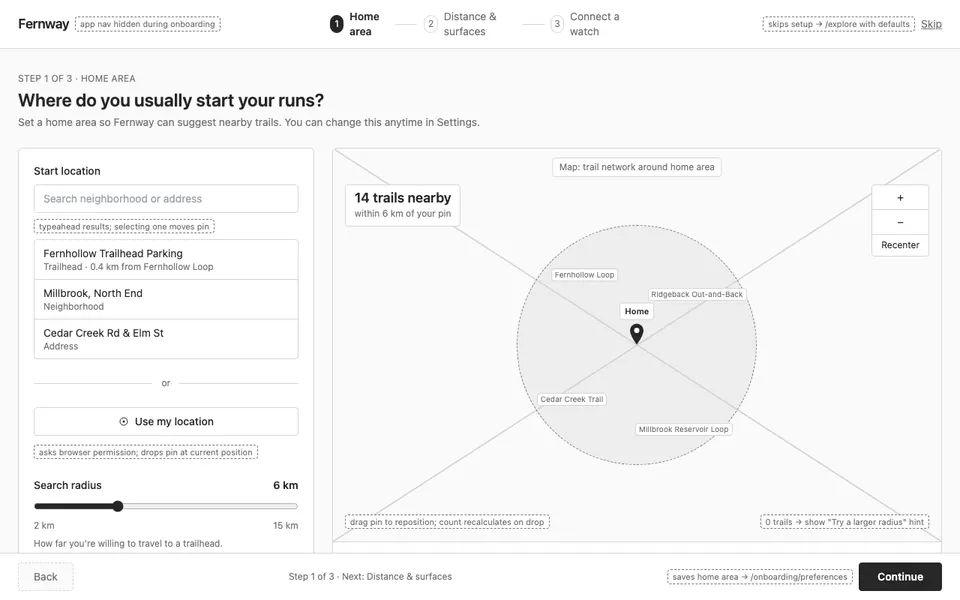
### 1. Onboarding Step 1 — Home Area
Route: `/onboarding/area` · Viewport: desktop

Where do I usually start my runs?

- **Progress header**: Fernway logo left, 3-step progress indicator (Step 1 of 3: Home area) centered, Skip link right; no sidebar during onboarding.
- **Area picker**: Split layout: left 1/3 has location search input ('Search neighborhood or address'), 'Use my location' button, and radius slider (2–15 km); right 2/3 map with draggable home pin and shaded radius circle showing trail count found (e.g. '14 trails nearby').
- **Footer actions**: Sticky footer with Back (disabled) and primary 'Continue' button to /onboarding/preferences.

### 2. Onboarding Step 2 — Distance & Surfaces
Route: `/onboarding/preferences` · Viewport: desktop

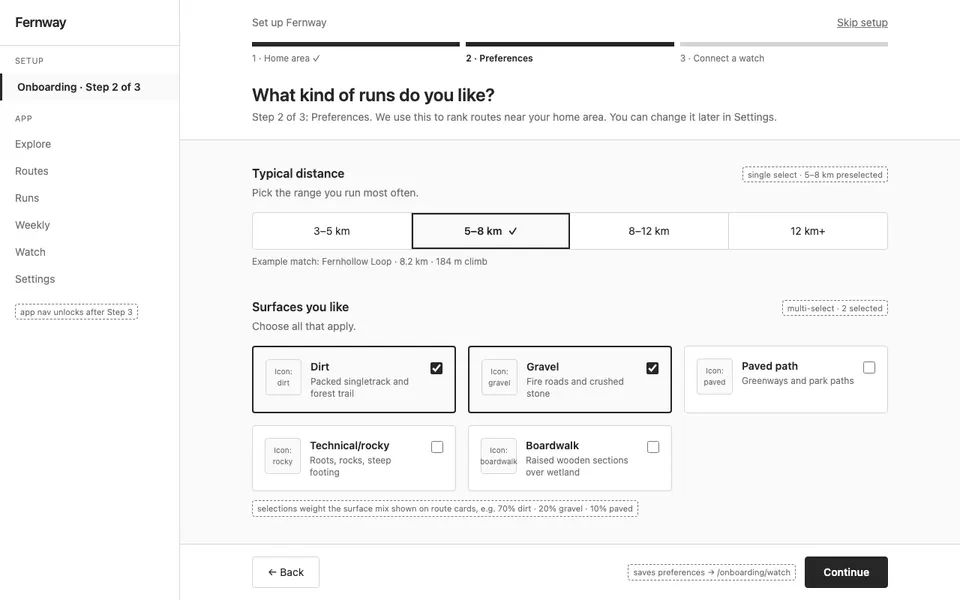
What kind of runs do I like?

- **Progress header**: Same header; progress indicator on Step 2 of 3: Preferences.
- **Typical distance**: Segmented chips: 3–5 km, 5–8 km, 8–12 km, 12 km+; one selectable, 5–8 km preselected.
- **Surfaces you like**: Three-column card grid of multi-select surface cards (Dirt, Gravel, Paved path, Technical/rocky, Boardwalk) each with icon and checkbox.
- **Route shape**: Toggle pair Loop / Out-and-back / No preference as radio cards.
- **Footer actions**: Back button and primary 'Continue' to /onboarding/watch.

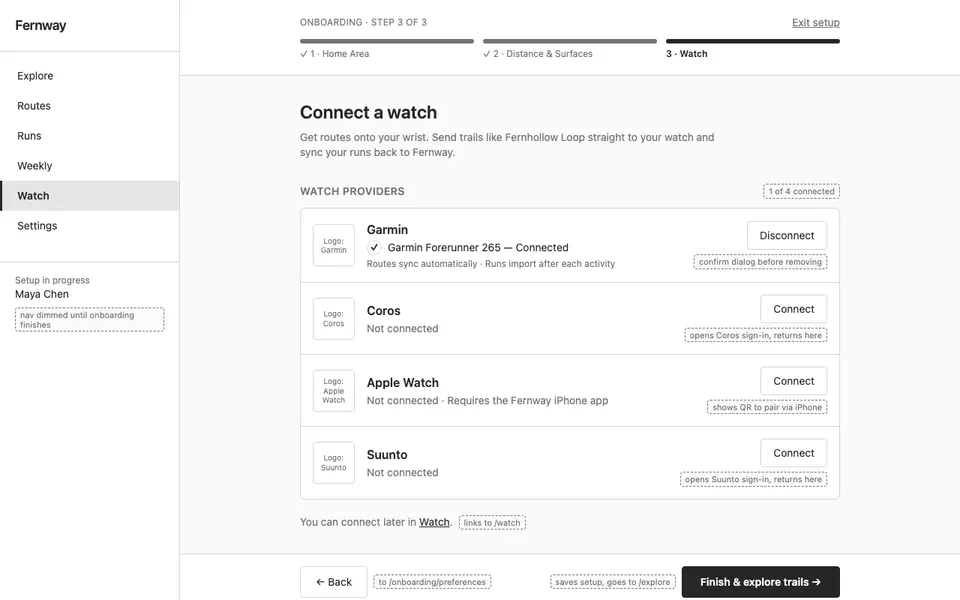
### 3. Onboarding Step 3 — Connect a Watch
Route: `/onboarding/watch` · Viewport: desktop

How do I get routes onto my wrist?

- **Progress header**: Same header; progress on Step 3 of 3: Watch.
- **Watch provider list**: Vertical list of provider rows (Garmin, Coros, Apple Watch, Suunto) each with logo placeholder and 'Connect' button; connected row shows 'Garmin Forerunner 265 — Connected' check state.
- **Skip note**: Muted text: 'You can connect later in Watch' with link.
- **Footer actions**: Back and primary 'Finish & explore trails' button leading to /explore.

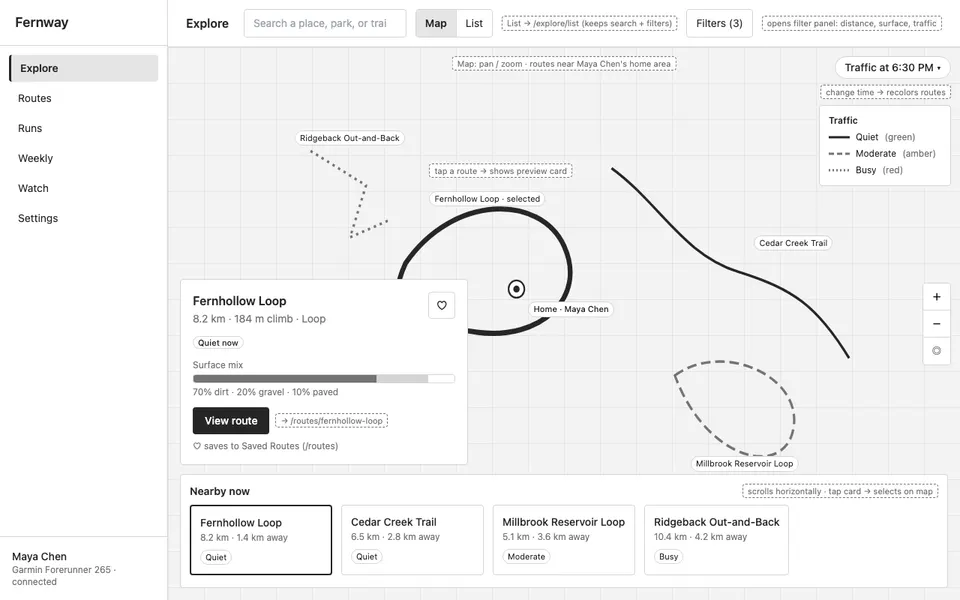
### 4. Explore — Map
Route: `/explore` · Viewport: desktop

Which quiet trails are near me right now?

- **Top bar**: Within sidebar shell: search input for place, Map/List view toggle (Map active) linking to /explore/list, 'Filters' button showing active filter count.
- **Full map**: Large map filling content area…
sitemap.md148 lines · 9.1k chars
CODE
Wireframe — Onboarding Step 1 — Home Area
Claude Opus 5.5HighDESIGN.md

Create the low-fidelity wireframe for the "Onboarding Step 1 — Home Area" screen of Fernway (route /onboarding/area, desktop viewport). PURPOSE Where do I usually start my runs? SECTIONS (top to bottom) - Progress header: Fernway logo left, 3-step progress indicator (Step 1 of 3: Home area) centered, Skip link right; no sidebar during onboarding. - Area picker: Split layout: left 1/3 has location search input ('Search neighborhood or address'), 'Use my location' button, and…

33 lines · 2.1k charsEditorExpand
AttachmentsResponse
SCREEN$0.21Run
COMPOSEDesktop
Onboarding Step 1 — Home Area
SCREEN
Wireframe — Onboarding Step 2 — Distance & Surfaces
Claude Opus 5.5HighDESIGN.md

Create the low-fidelity wireframe for the "Onboarding Step 2 — Distance & Surfaces" screen of Fernway (route /onboarding/preferences, desktop viewport). PURPOSE What kind of runs do I like? SECTIONS (top to bottom) - Progress header: Same header; progress indicator on Step 2 of 3: Preferences. - Typical distance: Segmented chips: 3–5 km, 5–8 km, 8–12 km, 12 km+; one selectable, 5–8 km preselected. - Surfaces you like: Three-column card grid of multi-select surface cards (Di…

35 lines · 2.1k charsEditorExpand
AttachmentsResponse
SCREEN$0.21Run
COMPOSEDesktop
Onboarding Step 2 — Distance & Surfaces
SCREEN
Wireframe — Onboarding Step 3 — Connect a Watch
Claude Opus 5.5HighDESIGN.md

Create the low-fidelity wireframe for the "Onboarding Step 3 — Connect a Watch" screen of Fernway (route /onboarding/watch, desktop viewport). PURPOSE How do I get routes onto my wrist? SECTIONS (top to bottom) - Progress header: Same header; progress on Step 3 of 3: Watch. - Watch provider list: Vertical list of provider rows (Garmin, Coros, Apple Watch, Suunto) each with logo placeholder and 'Connect' button; connected row shows 'Garmin Forerunner 265 — Connected' check s…

34 lines · 2k charsEditorExpand
AttachmentsResponse
SCREEN$0.14Run
COMPOSEDesktop
Onboarding Step 3 — Connect a Watch
SCREEN
Wireframe — Explore — Map
Claude Opus 5.5HighDESIGN.md

Create the low-fidelity wireframe for the "Explore — Map" screen of Fernway (route /explore, desktop viewport). PURPOSE Which quiet trails are near me right now? SECTIONS (top to bottom) - Top bar: Within sidebar shell: search input for place, Map/List view toggle (Map active) linking to /explore/list, 'Filters' button showing active filter count. - Full map: Large map filling content area with route polylines colored by traffic (quiet green, moderate amber, busy red), home…

34 lines · 2.3k charsEditorExpand
AttachmentsResponse
SCREEN$0.18Run
COMPOSEDesktop
Explore — Map
SCREEN
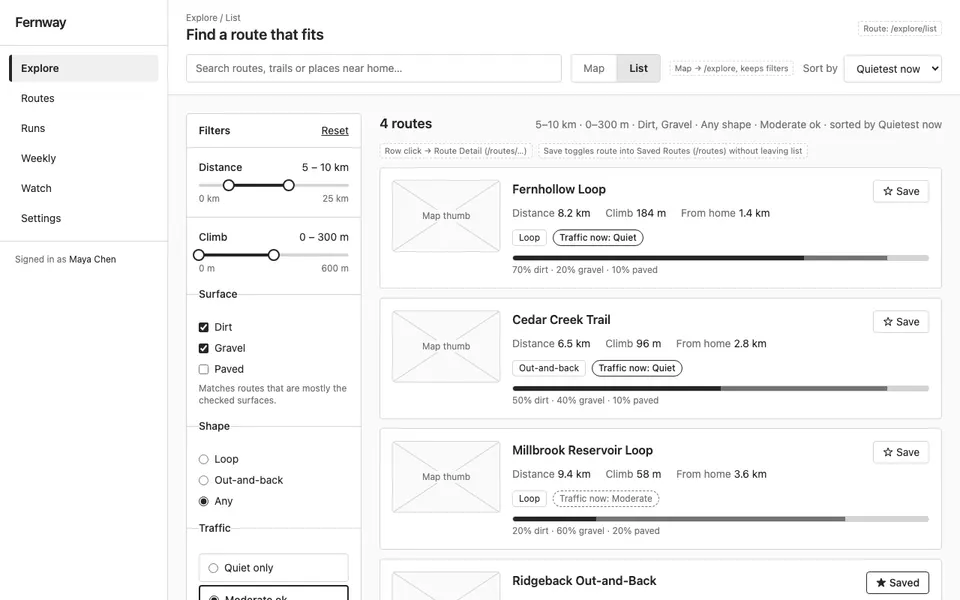
Wireframe — Explore — List with Filters
Claude Opus 5.5HighDESIGN.md

Create the low-fidelity wireframe for the "Explore — List with Filters" screen of Fernway (route /explore/list, desktop viewport). PURPOSE Which route matches my distance, climb, surface and crowd preference? SECTIONS (top to bottom) - Top bar: Search input, Map/List toggle (List active), sort dropdown (Quietest now, Closest, Distance). - Filter rail: Left column 1/4: distance range slider (5–10 km), climb range slider (0–300 m), surface checkboxes (Dirt, Gravel, Paved), sh…

34 lines · 2.4k charsEditorExpand
AttachmentsResponse
SCREEN$0.36Run
COMPOSEDesktop
Explore — List with Filters
SCREEN
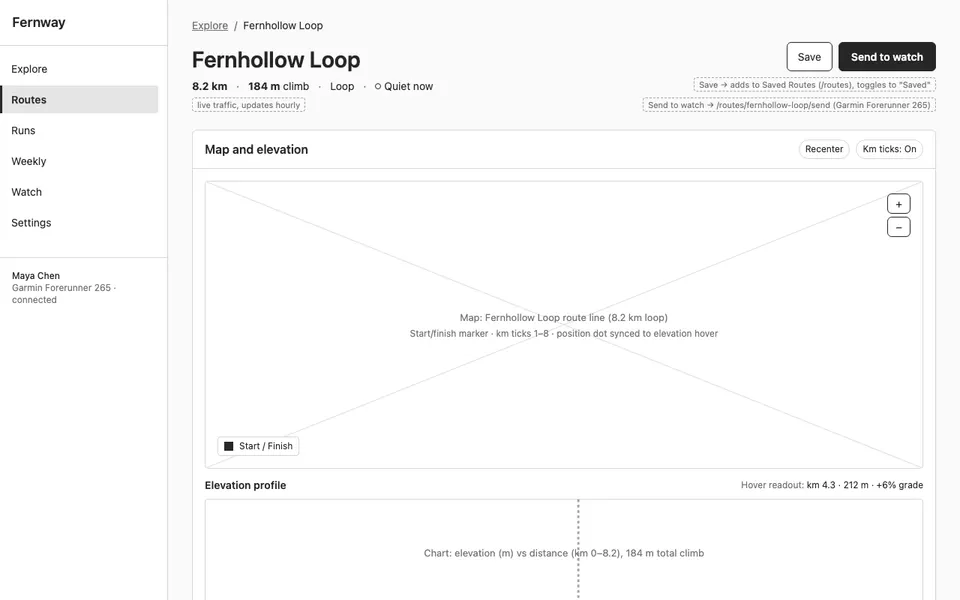
Wireframe — Route Detail
Claude Opus 5.5HighDESIGN.md

Create the low-fidelity wireframe for the "Route Detail" screen of Fernway (route /routes/fernhollow-loop, desktop viewport). PURPOSE Is this route right for today, and how do I get it on my watch? SECTIONS (top to bottom) - Header: Breadcrumb Explore / Fernhollow Loop, route name, stat row (8.2 km · 184 m climb · Loop · Quiet now), Save button and primary 'Send to watch' button. - Map and elevation: Two stacked panels: large route map with start marker and km ticks; below …

35 lines · 2.4k charsEditorExpand
AttachmentsResponse
SCREEN$0.24Run
COMPOSEDesktop
Route Detail
SCREEN
Wireframe — Send to Watch Confirmation
Claude Opus 5.5HighDESIGN.md

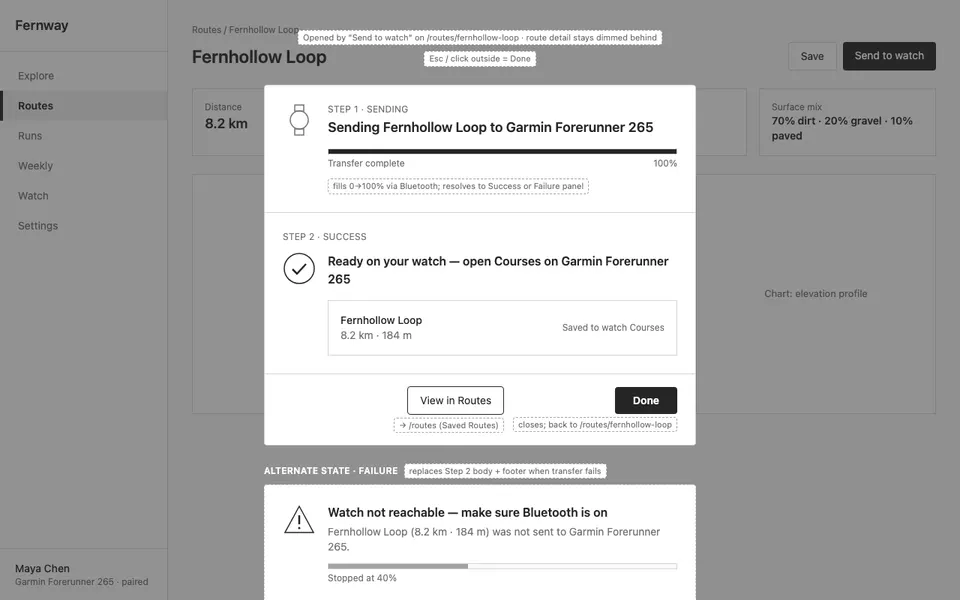
Create the low-fidelity wireframe for the "Send to Watch Confirmation" screen of Fernway (route /routes/fernhollow-loop/send, desktop viewport). PURPOSE Did my route reach my watch? SECTIONS (top to bottom) - Modal over route detail: Centered dialog over dimmed Route Detail: watch icon, 'Sending Fernhollow Loop to Garmin Forerunner 265', progress bar. - Success state: Checkmark, 'Ready on your watch — open Courses on Garmin Forerunner 265', route summary 8.2 km · 184 m, pri…

33 lines · 2k charsEditorExpand
AttachmentsResponse
SCREEN$0.19Run
COMPOSEDesktop
Send to Watch Confirmation
SCREEN
Wireframe — Post-run Rating
Claude Opus 5.5HighDESIGN.md

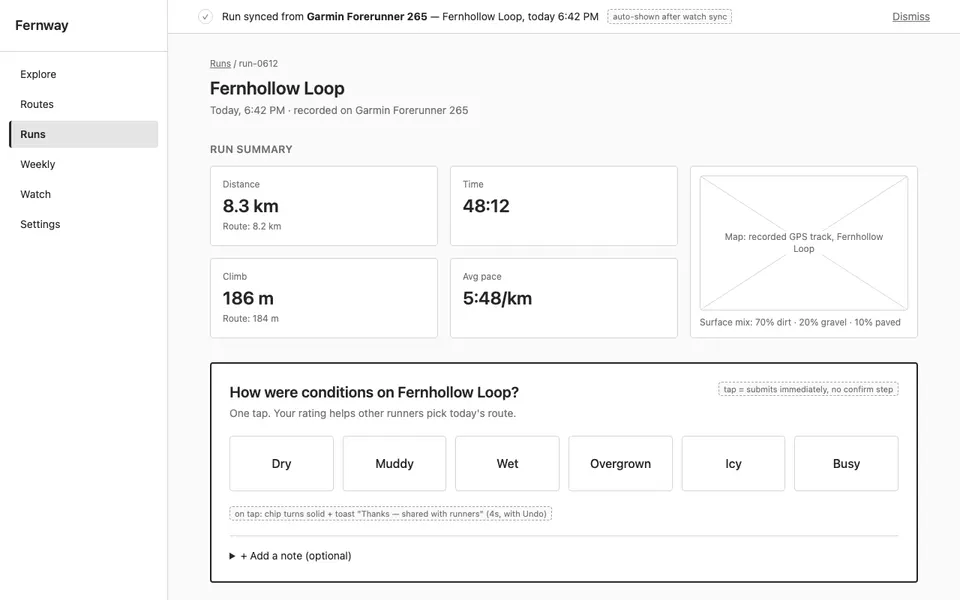
Create the low-fidelity wireframe for the "Post-run Rating" screen of Fernway (route /runs/run-0612, desktop viewport). PURPOSE How were conditions on the run that just synced? SECTIONS (top to bottom) - Sync banner: Top banner: 'Run synced from Garmin Forerunner 265 — Fernhollow Loop, today 6:42 PM'. - Run summary: Stat cards row: distance 8.3 km, time 48:12, climb 186 m, avg pace 5:48/km; small map of recorded track. - One-tap condition rating: Large row of tappable chips…

34 lines · 2k charsEditorExpand
AttachmentsResponse
SCREEN$0.15Run
COMPOSEDesktop
Post-run Rating
SCREEN
Wireframe — Runs History
Claude Opus 5.5HighDESIGN.md

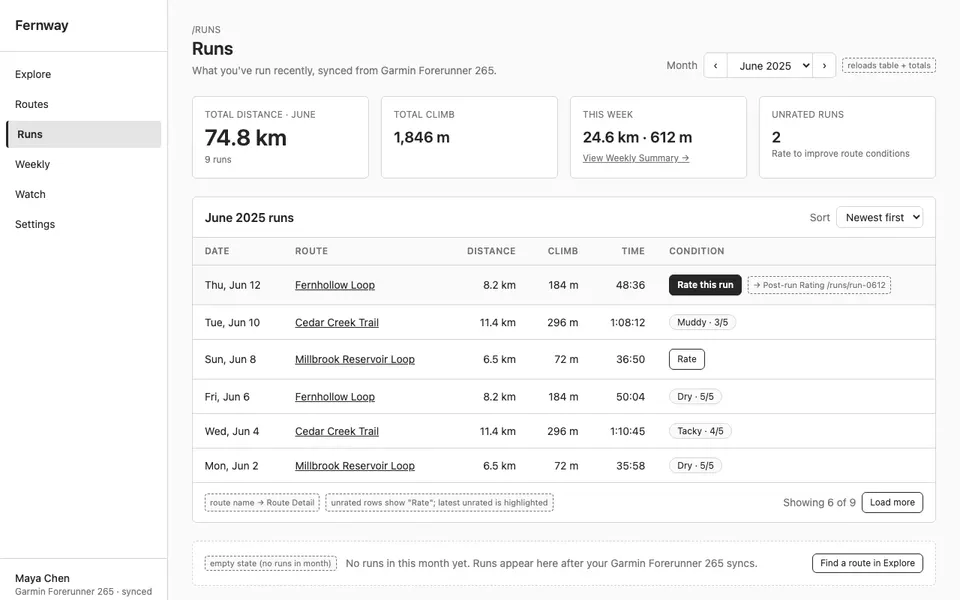
Create the low-fidelity wireframe for the "Runs History" screen of Fernway (route /runs, desktop viewport). PURPOSE What have I run recently? SECTIONS (top to bottom) - Header: Title Runs, month selector, total distance for month. - Runs table: Table rows: date, route (Fernhollow Loop, Cedar Creek Trail, Millbrook Reservoir Loop), distance, climb, time, condition rated chip or 'Rate' button for unrated runs linking to post-run rating. SHARED SHELL Navigation (sidebar): Exp…

32 lines · 1.8k charsEditorExpand
AttachmentsResponse
SCREEN$0.16Run
COMPOSEDesktop
Runs History
SCREEN
Wireframe — Weekly Summary
Claude Opus 5.5HighDESIGN.md

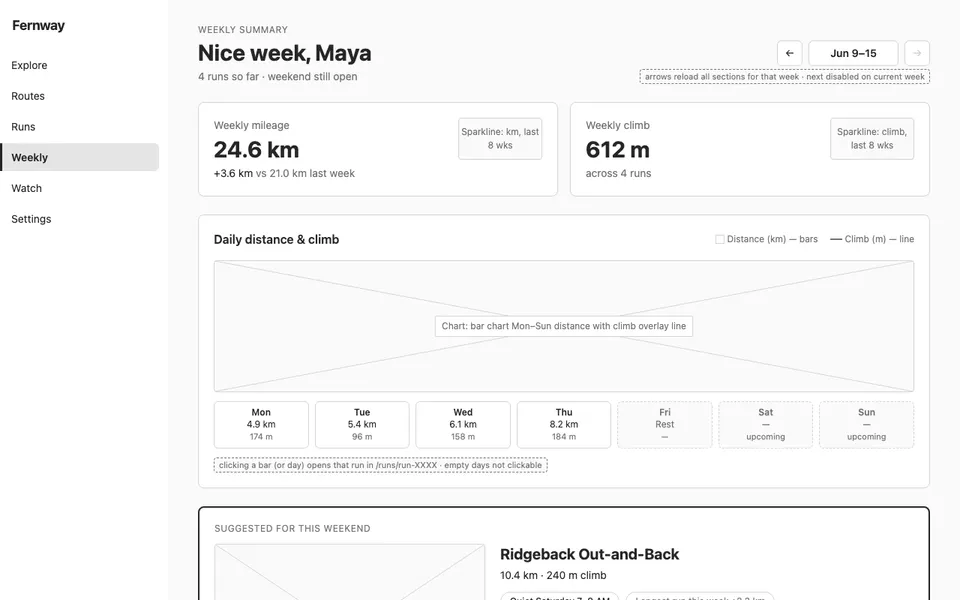
Create the low-fidelity wireframe for the "Weekly Summary" screen of Fernway (route /weekly, desktop viewport). PURPOSE How is my week going and where should I run this weekend? SECTIONS (top to bottom) - Header: Week selector (Jun 9–15) with prev/next arrows and greeting 'Nice week, Maya'. - Metric cards: Two-card row: Weekly mileage 24.6 km (vs 21.0 last week) and Weekly climb 612 m, each with small sparkline. - Daily chart: Bar chart Mon–Sun distance with climb overlay l…

35 lines · 2.1k charsEditorExpand
AttachmentsResponse
SCREEN$0.26Run
COMPOSEDesktop
Weekly Summary
SCREEN
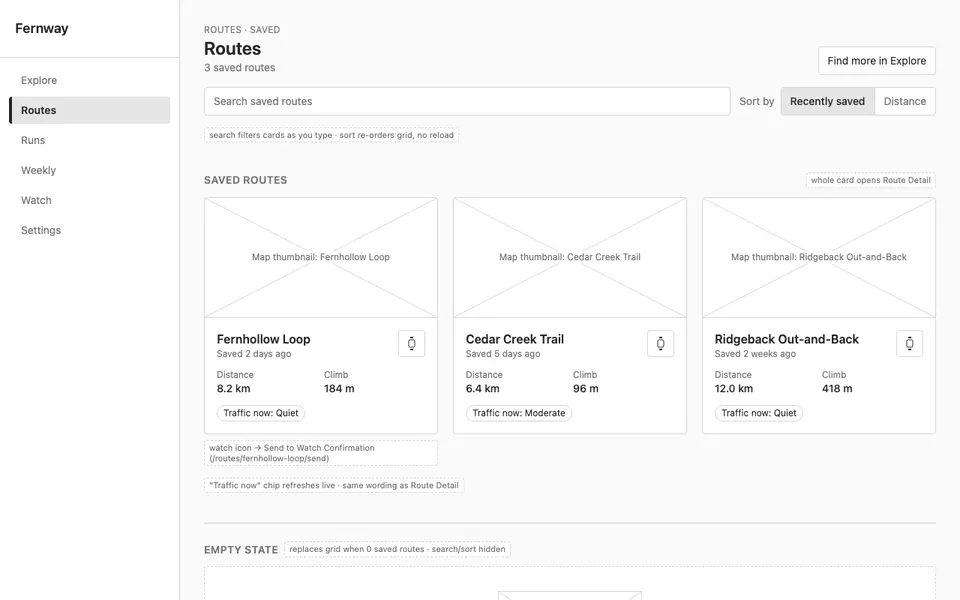
Wireframe — Saved Routes
Claude Opus 5.5HighDESIGN.md

Create the low-fidelity wireframe for the "Saved Routes" screen of Fernway (route /routes, desktop viewport). PURPOSE Which routes have I saved for later? SECTIONS (top to bottom) - Header: Title Routes, search saved routes, sort by Recently saved / Distance. - Saved route grid: Three-column card grid: Fernhollow Loop, Cedar Creek Trail, Ridgeback Out-and-Back, each with map thumbnail, distance, climb, traffic now chip, 'Send to watch' icon button; card opens route detail. …

33 lines · 1.9k charsEditorExpand
AttachmentsResponse
SCREEN$0.22Run
COMPOSEDesktop
Saved Routes
SCREEN
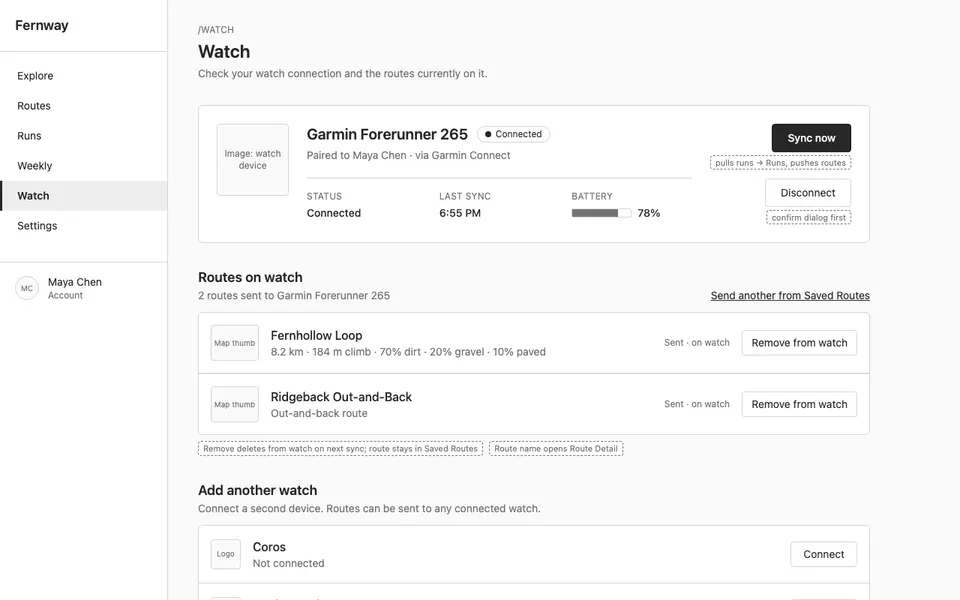
Wireframe — Watch
Claude Opus 5.5HighDESIGN.md

Create the low-fidelity wireframe for the "Watch" screen of Fernway (route /watch, desktop viewport). PURPOSE Is my watch connected and what's on it? SECTIONS (top to bottom) - Device card: Garmin Forerunner 265, status Connected, last sync 6:55 PM, battery, 'Sync now' and 'Disconnect' buttons. - Routes on watch: List of routes currently sent (Fernhollow Loop, Ridgeback Out-and-Back) with remove action. - Add another watch: Provider rows Coros, Apple Watch, Suunto with Conn…

33 lines · 1.8k charsEditorExpand
AttachmentsResponse
SCREEN$0.15Run
COMPOSEDesktop
Watch
SCREEN
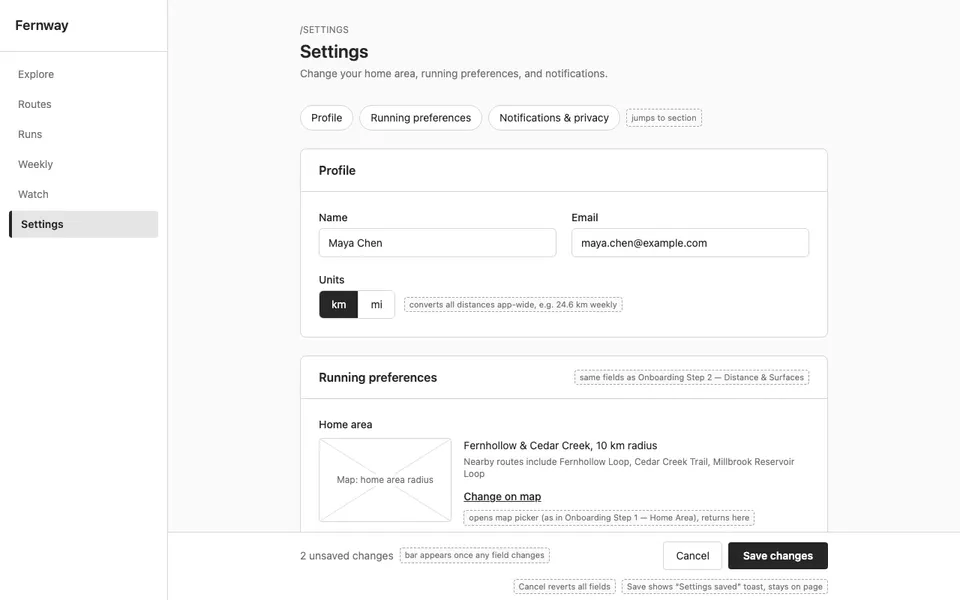
Wireframe — Settings
Claude Opus 5.5HighDESIGN.md

Create the low-fidelity wireframe for the "Settings" screen of Fernway (route /settings, desktop viewport). PURPOSE How do I change my home area and preferences? SECTIONS (top to bottom) - Profile: Name Maya Chen, email, units toggle km/mi. - Running preferences: Form: home area with 'Change on map' link, typical distance chips, surface multi-select, route shape radio — mirrors onboarding step 2. - Notifications & privacy: Toggles: weekend route suggestion, post-run rating …

34 lines · 1.9k charsEditorExpand
AttachmentsResponse
SCREEN$0.19Run
COMPOSEDesktop
Settings
SCREEN
Run all

A real run, unedited14 generations · $2.84 of walletBrand and inputs are fictional, made in Vmotif · 2026-09-25

What came back

Straight off the canvas.

Everything below is what this run returned, untouched.

  • sitemap.mdmarkdown
    # Fernway — Wireframe Sitemap
    
    ## Navigation (sidebar)
    - Explore → `/explore`
    - Routes → `/routes`
    - Runs → `/runs`
    - Weekly → `/weekly`
    - Watch → `/watch`
    - Settings → `/settings`
    
    ## Screens (13)
    
    ### 1. Onboarding Step 1 — Home Area
    Route: `/onboarding/area` · Viewport: desktop
How it runs

Two stages, in order.

What each stage reads, what it makes and what it cost on this run. Each stage starts once the one before it finishes. Steps inside a stage don’t wait on each other, so they run side by side.

  1. 01

    Wireframe Planner

    Reads your inputsMakes sitemap.md

    1 stepClaude Opus 5.5$0.17

  2. 02

    13 screens

    One per screen in stage 01’s plan

    • Onboarding Step 1 — Home Area
    • Onboarding Step 2 — Distance & Surfaces
    • Onboarding Step 3 — Connect a Watch
    • Explore — Map
    • Explore — List with Filters
    • Route Detail
    • Send to Watch Confirmation
    • Post-run Rating
    • Runs History
    • Weekly Summary
    • Saved Routes
    • Watch
    • Settings

    13 steps, side by sideClaude Opus 5.5$2.67

Where it fits

Part of a bigger job.

More in Design → code

Drop in a screenshot, a live URL, or a brand reference and get production-ready front-end code back.