IMAGE
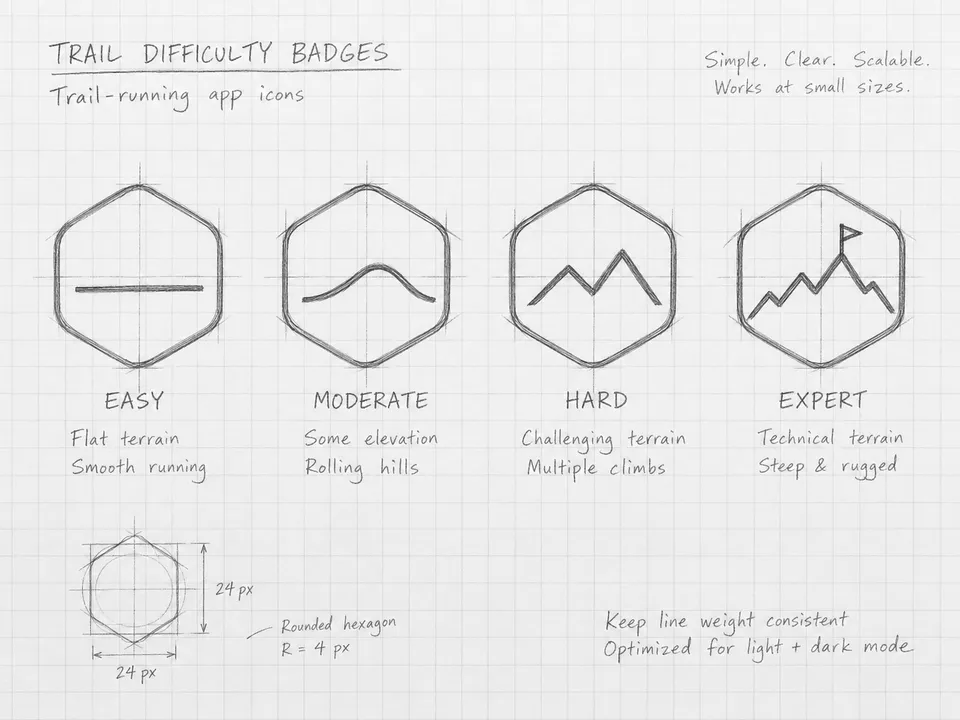
Reference Image (Optional)4:3
IMAGE
Generate clean, production-ready SVG markup from a prompt and an optional reference image.
· You bring Prompt + reference· output.svg
Turn the sketch into Fernway's four trail-difficulty badges (easy, moderate, hard, expert), laid out in one row: rounded hexagons with a single glyph each, forest #1F3A2E strokes on chalk #F4F1EA, the expert flag in signal orange #F26B3A. Create clean, production-ready SVG artwork from this prompt and optional reference image. Requirements: - Return valid standalone <svg>...</svg> markup - Use vector primitives and paths only (no raster output) - Keep the structure readable…

A real run, unedited1 generation · $0.12 of walletBrand and inputs are fictional, made in Vmotif · 2026-09-24
Everything below is what this run returned, untouched.
What each stage reads, what it makes and what it cost on this run.
Reads your inputsMakes 1 SVG
This run went through the Vmotif MCP server, the way Claude Code, Cursor or any MCP client drives it: seed the canvas, fill the inputs, run the graph.
create_canvas({ premade_workflow_id: "svg-generator" })
update_canvas({ canvas_id, updates: [/* your inputs */] })
run_workflow({ workflow_id: canvas_id })Produce finished visual assets — vectors, video, and bulk style variations — straight from the canvas.